> Perfect Lighthouse 100s on Astro: Performance, A11y, Best Practices, SEO
How jsonld.com hits 100 / 100 / 100 / 100 in Lighthouse. A lightweight system-font theme, static Astro output, Partytown for GA, WCAG AA contrast, and clean structured data.
- published
- modified
- size
- 7.1K
- path
- /perfect-lighthouse-100-scores/
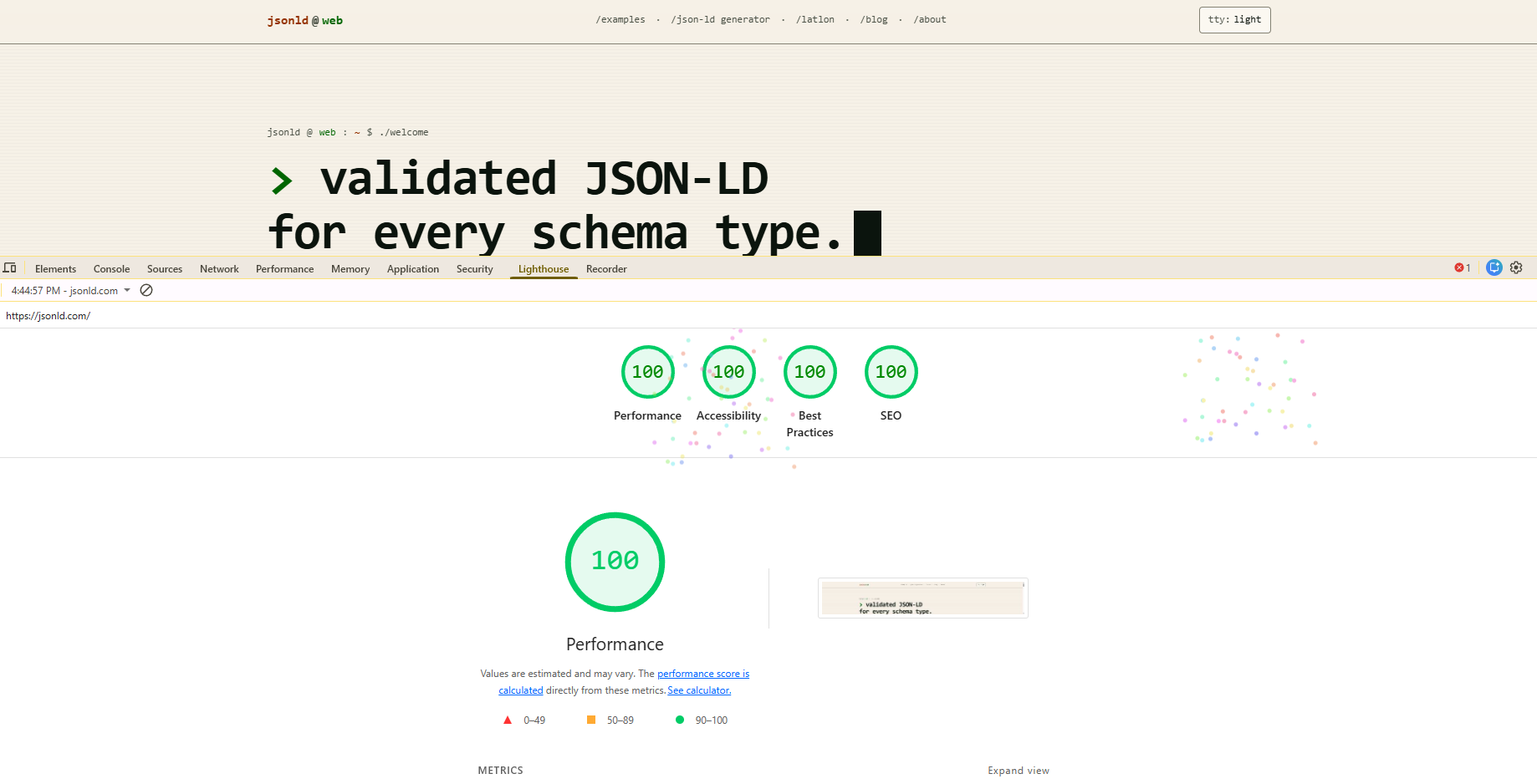
jsonld.com now scores a clean 100 across all four Lighthouse categories: performance, accessibility, best practices, and SEO. Static HTML on a single Vultr box, no CDN origin shield, no edge functions. Just files.
This post is the short version of how we got there. Most of it is what we did not ship.
the theme is the lightest part
The site uses zero web fonts. Every text run resolves through the system monospace stack:
font-family: ui-monospace, SFMono-Regular, Menlo, Monaco,
             Consolas, 'Liberation Mono', 'Courier New', monospace;
That single decision removes a render-blocking font request, kills FOIT/FOUT, and trims a chunk of layout shift before it ever happens. The terminal aesthetic is not a gimmick. A monospace grid means every character cell is predictable, so headings, code blocks, and prose share one rhythm and the page does not reflow when fonts swap in. It is the cheapest design choice on the site and it is doing more work than anything else.
The whole stylesheet is small enough that Astro inlines the critical portion straight into <head>. We set build.inlineStylesheets: "auto" in astro.config.mjs and let the bundler decide. Above-the-fold styles ship in the HTML payload, and there is no separate render-blocking CSS round trip.
static output, served as files
Astro emits one HTML file per route at build time. There is no PHP runtime, no Node server, no database query on request. npm run build writes dist/, we cp -r it into /var/www/html, and OpenLiteSpeed serves it with gzip. Total time to first byte on a warm cache is in the low tens of milliseconds.
Every page is also pretty-printed by prettier as a post-build step, so view-source on any URL reads like a human wrote it. That has nothing to do with Lighthouse but it is part of why the site exists.
analytics off the main thread
Google Tag Manager was the single biggest performance hit before we touched it: about 882 ms of main-thread time and 1.1 MB of third-party JavaScript on every page load. Lab Lighthouse sat at 66.
Partytown moves both GA and GTM into a web worker. The main thread never parses or executes gtm.js. gtag() and dataLayer.push() still work because Partytown proxies them back to the worker, so the analytics pipeline is unchanged. We pair it with a pair of <link rel="preconnect"> hints for the analytics origins so the TLS handshake overlaps with HTML parse.
Result, on the same page that used to score 66:
metric          before   after
performance     66       100
LCP             1.4s     0.6s
TBT             1280ms   0ms
CLS             0        0
speculation rules for the next click
Every layout includes a <script type="speculationrules"> block telling supported browsers to prefetch any same-origin link on pointer hover. The next page is usually already in cache by the time the click registers. This does not change Lighthouse scores, but it changes how the site feels.
accessibility: AA contrast everywhere
The hard part of a high-contrast retro palette is keeping it readable. Phosphor green on near-black looks great until you pair it with black text and trip the contrast checker. We picked one rule and kept it: every green button or interactive surface uses text-(--color-on-green), which resolves to white in light mode and near-black in dark mode. Both pass WCAG AA against the green fill.
The rest of the accessibility checklist is small and boring:
- Every form control in the generator has a programmatic label.
- The theme toggle has a real
aria-labelthat updates with state. - The CRT scanline overlay is
pointer-events: noneandaria-hidden. - Every image has an
altattribute, including this one. - Heading order is strict: one
h1per page, thenh2down.
Published the audit at /ada.txt so the work is grep-able.
best practices, the boring 100
Best Practices is the easiest category to take for granted and the easiest to lose silently. The checks that bite static sites: mixed content, deprecated APIs, console errors, missing CSP-related headers, oversized images served at small dimensions. We do not have any of those. Every script is HTTPS, every image is sized to its rendered box, the console is clean, and there are no third-party trackers running on the document thread (see Partytown above).
SEO: the part this site is supposed to be good at
This is a reference site for structured data, so the SEO score had better be 100. The Lighthouse SEO audit is mostly a checklist of fundamentals: a non-empty title, a meta description, a canonical, a viewport tag, indexable robots, descriptive link text, valid hreflang if used, an HTTP status of 200. Each one of those lives in the page layout and is generated from the per-page JSON in src/content/pages/, which we extracted from the old WordPress site so URL parity stayed intact.
On top of the Lighthouse checks, every page ships its full JSON-LD graph: WebPage, BreadcrumbList, WebSite, plus the example schema the page is teaching. The graph is owned by code, not by a plugin, so a diff in git is the only way it changes.
what is not in the list
No CDN. No edge worker. No image CDN. No build-time HTML minifier (we pretty-print, on purpose). No service worker. No framework router; Astro is content-driven and the speculation rules cover the rest. Lighthouse 100 is not a budget for fancy infrastructure. It is what you get when you stop shipping things that do not earn their weight.
reproducing it
If you want to copy the recipe on your own Astro site, the short list is:
- Use a system font stack. Drop web fonts unless a brand requirement actually forces them.
- Keep the theme small enough that
build.inlineStylesheets: "auto"can inline it. - Move GA, GTM, and any other third-party tag through Partytown.
- Preconnect to the origins your tags do reach.
- Add a speculation-rules prefetch script for same-origin links.
- Pick on-green and on-amber text colors that pass WCAG AA in both modes.
- Generate every meta and JSON-LD tag from data files, not from per-page templates.
That is the whole list. The full source is at github.com/patrickcoombe/jsonld if you want to read the actual config.